

High availability
High availability restarts a machine on a surviving node when the node running it fails. It is configured under Datacenter → HA.
This page covers HA in depth. If you have not yet built a cluster, start with Clustering and high availability — a cluster is a prerequisite.
Before you turn it on
Section titled “Before you turn it on”| Requirement | Why |
|---|---|
| Three or more nodes | Two nodes cannot form a majority, so a failure leaves the survivor unable to act. |
| Storage the other nodes can reach | HA restarts a machine; it does not copy disks. Use shared storage, or replication. |
| Synchronised clocks | Drift breaks cluster authentication — see Fixing “Authentication failed! (401)”. |
| A licence that covers high availability | Required to add an HA resource. |
Reading the status panel
Section titled “Reading the status panel”Datacenter → HA shows a status list above the protected machines.
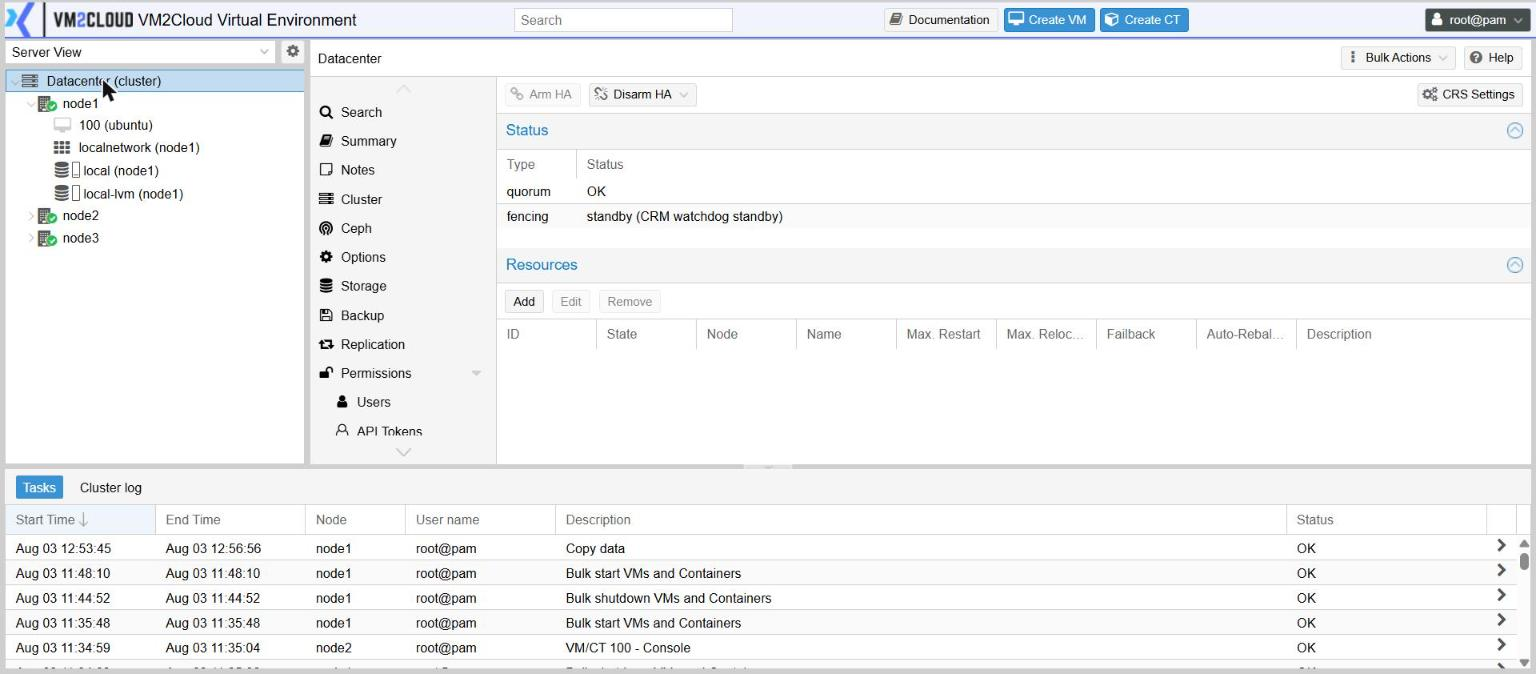
| Row | Normal reading |
|---|---|
| quorum | OK — a majority of nodes can see each other |
| fencing | standby when nothing is protected yet |
Protecting a machine
Section titled “Protecting a machine”- Open Datacenter → HA.
- Under the resource list, click Add.
- Choose the machine in VM.
- Set Request State to started.
- Adjust the fields below if the defaults do not suit.
- Click Add.
You can also do this from the machine itself with More → Manage HA, or by ticking Add to HA while creating it.
The fields
Section titled “The fields”| Field | What it does |
|---|---|
| Max. Restart | How many times to retry starting on the same node before giving up on that node. |
| Max. Relocate | How many times to try a different node before the machine is left in an error state. |
| Failback | Whether the machine returns to its preferred node once that node is healthy again. |
| Auto-Rebalance | Whether the cluster may move this machine to even out load. |
| Request State | What the cluster should aim for — usually started. |
Affinity rules — controlling placement
Section titled “Affinity rules — controlling placement”Datacenter → HA → Affinity Rules decides where machines are allowed or preferred to run.
Two kinds of rule:
- Machine to node — this machine prefers, or requires, these nodes. Use it when only some nodes have the hardware, network or licensing a machine needs.
- Machine to machine — keep these together, or keep these apart. Keeping a pair apart is what stops a single node failure taking out both halves of a redundant service.
Each rule has a Strict setting, and it changes the meaning completely:
| Strict | Behaviour |
|---|---|
| Off | A preference. The cluster honours it when it can, and ignores it rather than leave the machine down. |
| On | A requirement. If it cannot be satisfied, the machine does not start at all. |
Fencing
Section titled “Fencing”Datacenter → HA → Fencing shows how the cluster makes certain a failed node has really stopped before another node starts its machines.
This matters more than it sounds. If the original node were still running the machine and a second copy started elsewhere, both would write to the same disks. The cluster therefore waits — deliberately, not slowly — until it is certain, which is why recovery is not instant.
The built-in watchdog handles this without configuration. The list here is for sites that add external fencing devices.
Pausing HA for maintenance
Section titled “Pausing HA for maintenance”Arm HA and Disarm HA at the top of the panel switch the whole mechanism on and off, leaving your resource definitions in place.
Disarm before work that would make a node look like it has failed — a firmware update, a network change, physically moving a server. Otherwise the cluster reacts to your maintenance as though it were an outage.
Remember to arm it again afterwards. A disarmed cluster protects nothing.
Where the cluster puts things
Section titled “Where the cluster puts things”CRS Settings, also on this panel, controls how the cluster chooses a target node when placing or rebalancing machines — whether it balances on memory, on CPU, and whether it rebalances on its own.
Testing failover
Section titled “Testing failover”Do this before you depend on it, during a maintenance window.
- Note which node currently runs the protected machine.
- Cut power to that node abruptly, or use its remote power control. A clean shutdown is not a realistic failure test — it lets the machine migrate gracefully instead.
- Watch Datacenter → HA. After the cluster confirms the node is gone, the machine moves to a surviving node and starts there.
- Check the machine’s service is actually working, not just that it is running.
- Power the failed node back on and confirm it rejoins.
If something goes wrong
Section titled “If something goes wrong”| What you see | What to do |
|---|---|
| A machine does not restart elsewhere | Its disks are on storage the other nodes cannot reach. Use shared storage or replication. |
| A machine will not start anywhere | A strict affinity rule cannot be satisfied. Relax it or fix the constraint. |
| The cluster will not act at all | Quorum has been lost, or HA is disarmed. Check the status list. |
| Recovery seems slow | It is deliberate. The cluster must be certain the node is gone before starting the machine elsewhere. |
| Adding a resource is refused with a licence message | The node’s licence does not cover high availability, or has lapsed. Check node → Subscription. |
| Machines moved on their own | Auto-Rebalance is on for those resources. |
Still stuck? Contact VM2Cloud support.