

Software-defined networking
By default a machine attaches to a bridge on the node it runs on, and its network is whatever that bridge is connected to. Datacenter → SDN lets you define networks centrally instead, and have machines attach to those.
This is worth doing when you want networks that follow machines across nodes, isolated networks per team or customer, or address management handled for you.
If you only need machines on the same network as the node, you do not need any of this — see Node network configuration.
How it fits together
Section titled “How it fits together”| Object | What it is |
|---|---|
| Zone | A networking technology, and the nodes it applies to |
| VNet | A virtual network inside a zone. Machines attach to this. |
| Subnet | The address range and gateway on a VNet |
| IPAM | Hands out addresses from those subnets |
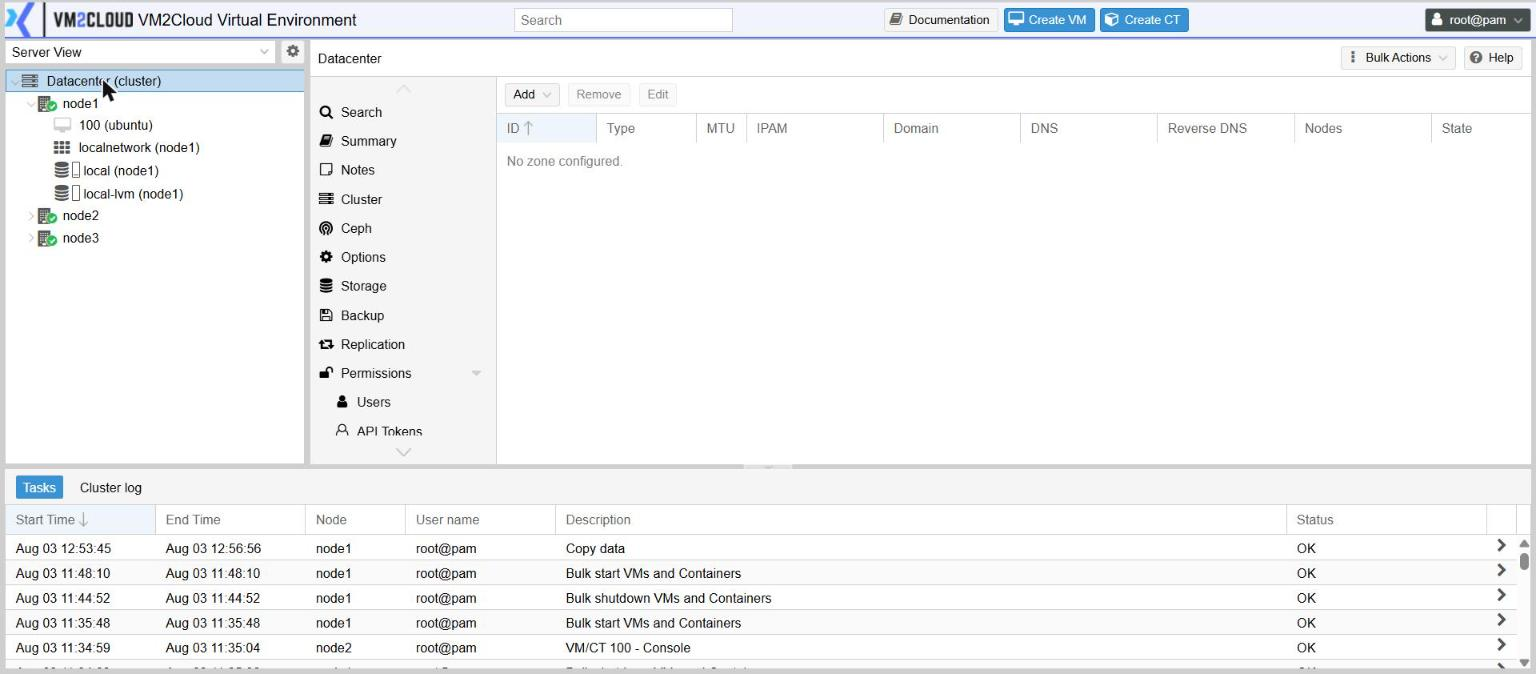
A cluster that has never used SDN still shows one zone per node, named localnetwork —
that is the node’s existing bridge presented as a zone. The Zones panel itself starts
empty, because that default zone is not something you configured:
Changes are staged
Section titled “Changes are staged”Zones, VNets and the routing objects have a State column. Changes are held until applied, which lets you build a complete design and commit it once.
Check State before assuming a change is live.
Choosing a zone type
Section titled “Choosing a zone type”| Type | What it does | Use it when |
|---|---|---|
| Simple | An isolated network on each node, with optional routing and NAT | You want a private network for a group of machines, with no switch configuration |
| VLAN | Each VNet is a VLAN on an existing bridge | Your switches already carry VLANs. The most common choice. |
| QinQ | VLANs stacked inside a VLAN | You give each tenant their own VLAN space inside one provider VLAN |
| VXLAN | A layer-2 network stretched across nodes over a routed network | Nodes are on different networks and machines must share one |
| EVPN | VXLAN with a routing control plane and an exit point to the outside | Multi-tenant routing at scale |
Creating a network
Section titled “Creating a network”1. Create a zone
Section titled “1. Create a zone”- Open Datacenter → SDN → Zones.
- Click Add and choose the type.
- Give it an ID.
- Set Nodes to the nodes it applies to, or leave empty for all.
- Fill in the type-specific fields — a VLAN zone needs the bridge its VLANs live on.
- Click Add.
2. Create a VNet
Section titled “2. Create a VNet”- Open Datacenter → SDN → VNets.
- Click Create.
- Give it an ID and select the Zone.
- For a VLAN or VXLAN zone, set Tag to the VLAN or network identifier.
- Tick VLAN Aware if machines on it will carry their own tags.
- Click Create.
3. Add a subnet
Section titled “3. Add a subnet”Select the VNet, then click Create in the Subnets panel. Enter the address range in Subnet and set its Gateway. Turn on SNAT if machines on this network need outbound access through the node.
4. Apply
Section titled “4. Apply”Open Datacenter → SDN, click Apply and confirm the question that appears. Apply also applies any node network changes that are waiting, and the confirmation says so. Then return to Zones or VNets and confirm State shows the change as live.
5. Attach a machine
Section titled “5. Attach a machine”Edit the machine’s network adapter under guest → Hardware. The VNet appears in the bridge list; select it instead of a plain bridge.
Address management
Section titled “Address management”Datacenter → SDN → IPAM shows which address each machine holds on each network, with its MAC address and gateway. Addresses are allocated from the subnets you defined.
This is mostly a view rather than a place you configure things — it answers “what address does this machine have” without opening its console.
SDN → Options is where additional address-management or DNS backends are registered, if you integrate with an external system. The built-in one needs no configuration.
Firewalling a virtual network
Section titled “Firewalling a virtual network”Datacenter → SDN → VNet Firewall attaches rules to the network itself, so the policy applies to everything on it regardless of which machine. Rules work exactly as described in Firewall.
This is the cleanest way to express “machines on this network may not talk to that network”.
The routed features
Section titled “The routed features”Fabrics, Route Maps and Prefix Lists support VXLAN and EVPN designs: the fabric defines the routed network between nodes, and route maps and prefix lists control which routes are accepted and advertised.
If something goes wrong
Section titled “If something goes wrong”| What you see | What to do |
|---|---|
| A VNet is not offered on a machine’s network adapter | The zone excludes that node, or the change was never applied. Check Nodes and State. |
| Machines on a VNet cannot reach each other | For a VLAN zone, confirm the switch carries that VLAN to every node involved. |
| No outbound access from a Simple zone | The subnet needs a gateway, and SNAT turned on. |
| Machines have no address | No subnet is defined, or the machine is set to a static address outside it. |
| A change did nothing | It is still pending. Apply it and check State. |
Still stuck? Contact VM2Cloud support.