Node menu reference
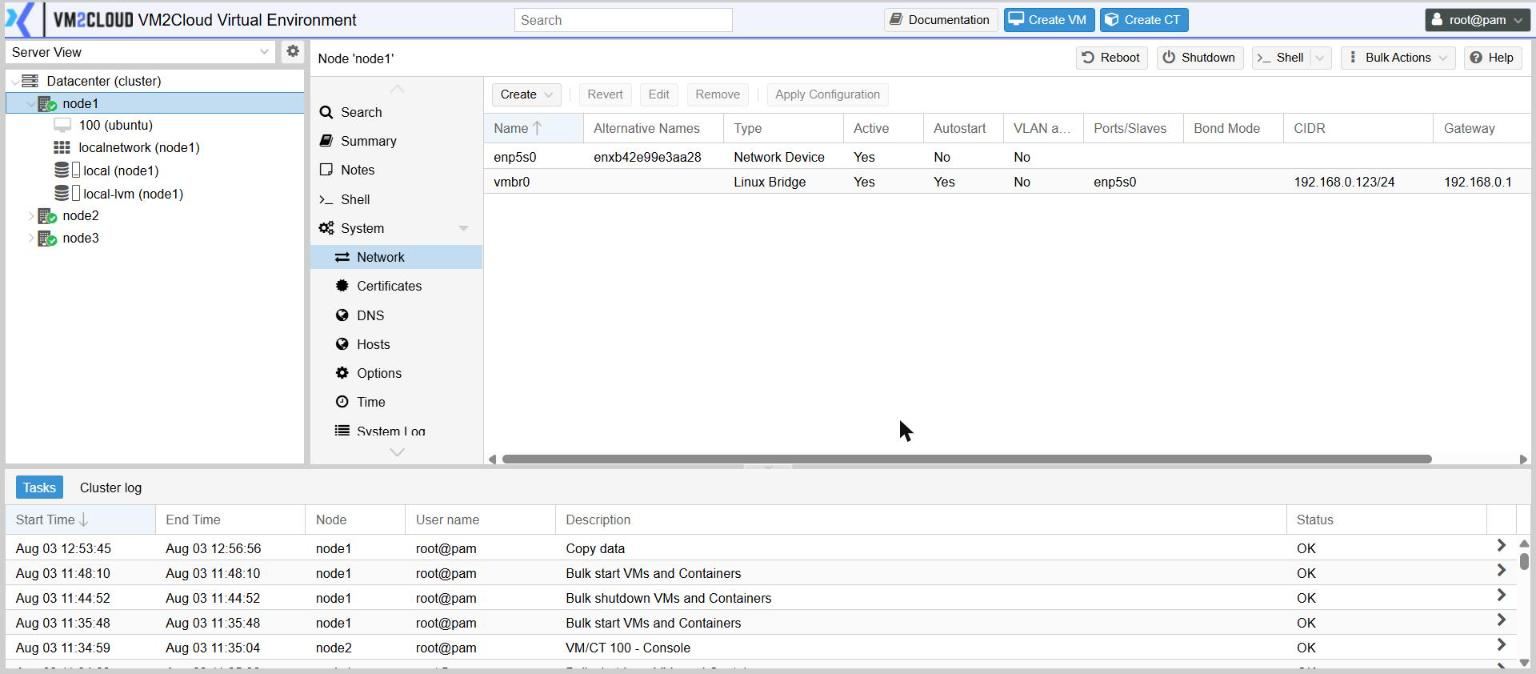
Select a node in the tree and the content panel offers the settings for that one server. Where the Datacenter menu decides how the system behaves, this menu decides how one machine is configured.
Every node panel keeps three buttons in its toolbar: Reboot, Shutdown and Shell.
Shell opens a terminal session on the server. Nothing in this documentation asks you to use it; VM2Cloud support may, while helping with a problem.
At a glance
Section titled “At a glance”| Entry | What it is for |
|---|---|
| Search | Find things on this node |
| Summary | This node’s status, graphs and component versions |
| Notes | A note about this server |
| Shell | A terminal session on the server |
| System | Network, certificates, name resolution, options, time, logs |
| Updates | Apply updates; online repositories and offline bundles |
| Firewall | This node’s own firewall rules and log |
| Disks | Physical disks, and the storage built on them |
| Ceph | This node’s part of hyper-converged storage |
| Replication | Replication jobs involving this node |
| Task History | Everything that has run here, and by whom |
| Subscription | Licence state for this node |
Search
Section titled “Search”The same resource list as Datacenter → Search, narrowed to this node.
Summary
Section titled “Summary”Status and time-series graphs for the server itself: CPU, memory, disk, network and load. Use the period selector above the graphs to widen the window, and Maximum / Average to switch how each point is calculated — averages hide short spikes that maximums reveal.
Package versions lists the installed components and their versions. Have this open when you contact support.
A free-text note about this server specifically — which rack, which power feed, which switch ports, anything the next person will want. Separate from the datacenter-wide note.
System
Section titled “System”| Entry | What it holds |
|---|---|
| Network | Bridges, bonds and VLANs — see Node network configuration |
| Certificates | The certificates this node presents — see Certificates |
| DNS | Search domain and name servers |
| Hosts | Static name-to-address entries for this node |
| Options | Node-level settings, some inherited from the datacenter |
| Time | Time zone, and the current server time |
| System Log | The server’s log, live or over a chosen period |
Search domain and up to three name servers. Edit to change them.
Static name-to-address entries, including the node’s own name.
Options
Section titled “Options”| Setting | What it does |
|---|---|
| Location | Geographic label. Reads from Datacenter options until overridden here. |
| Start on boot delay | How long to wait after the node boots before starting machines, so storage and networking settle first. |
| MAC address for Wake on LAN | Lets the node be powered on remotely. |
| RAM usage target for ballooning | How much of the host’s memory to keep in use before reclaiming memory from machines that allow it. |
Shows the time zone and the live server clock. Edit changes the time zone.
The clock itself is kept synchronised automatically; there is no setting for it here.
System Log
Section titled “System Log”The server’s log. Live Mode follows it as it happens; Select Timespan jumps to a window around a known incident.
This is the system log. Output from a specific action is under Task History, and blocked network traffic is under Firewall → Log.
Updates
Section titled “Updates”Available updates for this node, with Refresh to check, Changelog to see what an update contains, and Upgrade to apply.
| Entry | What it holds |
|---|---|
| Repositories | Which update sources this node uses |
| Update Bundles | Offline updates, uploaded rather than downloaded |
Before you apply updates to a production node, contact VM2Cloud support to confirm the right update path for your release.
Firewall
Section titled “Firewall”This node’s own rules, plus Options for the node-level switches and Log for traffic the firewall acted on.
See Firewall.
The physical disks in this server and their health, plus the entries that turn them into usable storage: LVM, LVM-Thin, Directory and ZFS.
This node’s part of hyper-converged storage — its configuration, monitors, OSDs, shared filesystem and pools. Present only once Ceph is installed.
Replication
Section titled “Replication”Replication jobs that involve this node, with Log for a job’s last run and Schedule now to run one immediately.
See Replication.
Task History
Section titled “Task History”Everything that has run on this node, with who ran it, when, and whether it succeeded.
- View Task opens the full output of one task.
- Download saves it — do this before contacting support.
- Filter narrows by type, user or status.
Subscription
Section titled “Subscription”The licence state of this node.
| Button | What it does |
|---|---|
| Download License Request | Produces the file identifying this node, for the licensing portal |
| Upload License | Installs the licence file the portal returns |
| Check | Re-validates the installed licence |
| Remove Subscription | Removes the licence from this node |
| System Report | Generates a diagnostic bundle for support |