

Node network configuration
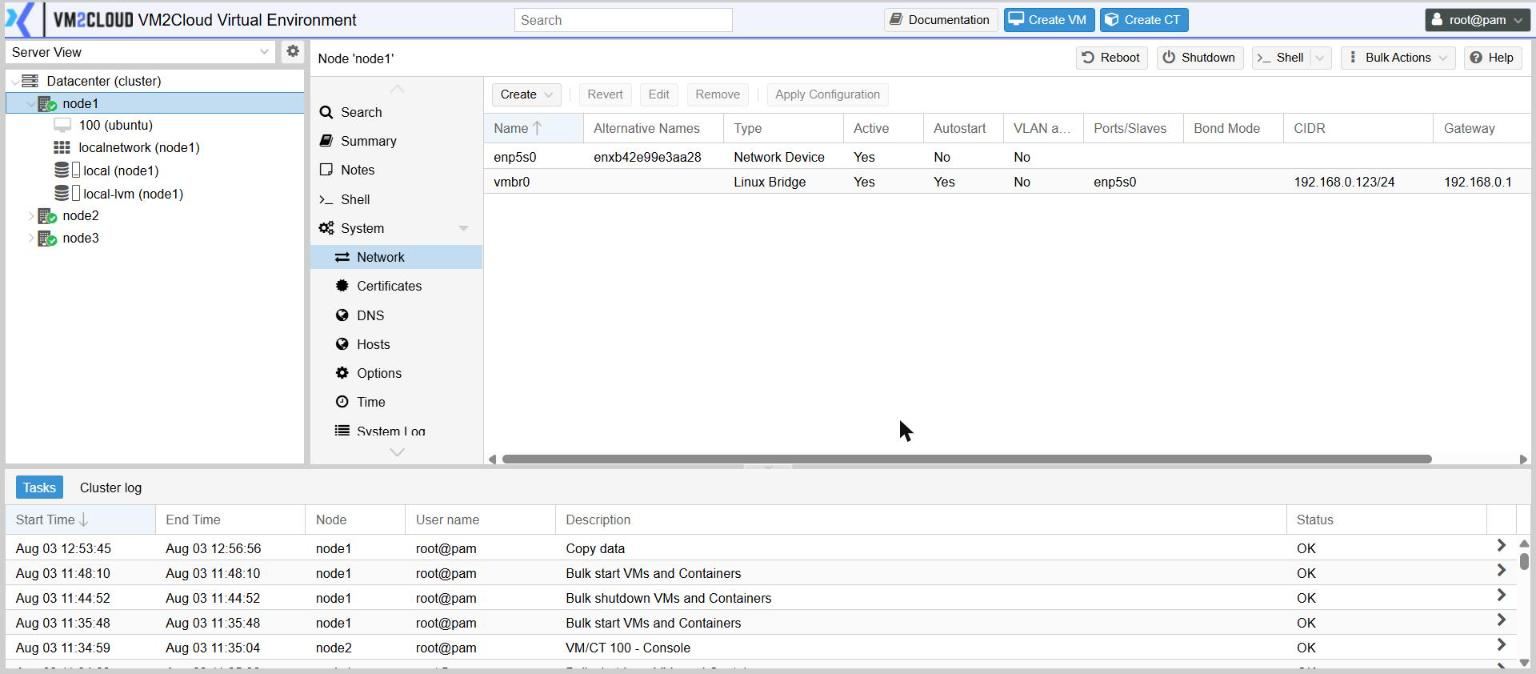
Each node’s networking is configured under node → System → Network. This is where the bridge that guests attach to lives, along with any bonds and VLANs beneath it.
What a new node looks like
Section titled “What a new node looks like”| Name | Type | Ports | Address |
|---|---|---|---|
enp5s0 |
Network Device | (none) | |
vmbr0 |
Linux Bridge | enp5s0 |
the management address |
The physical adapter carries no address of its own; it is a port on a bridge, and the bridge holds the address. Machines attach to the bridge, which is why they appear on the same network as the node.
Changes are staged, not immediate
Section titled “Changes are staged, not immediate”This panel does not apply changes as you make them. Edits are held as a pending configuration and only take effect when you click Apply Configuration. Revert discards everything pending.
That is deliberate: you can build a whole new bond and bridge, review it, and commit once.
Before applying a change to the management interface, make sure you have another way in — console access, or someone physically present.
The interface types
Section titled “The interface types”Create offers six:
| Type | What it is for |
|---|---|
| Linux Bridge | A virtual switch. What machines attach to. |
| Linux Bond | Several physical adapters combined for redundancy or throughput. |
| Linux VLAN | One VLAN split out of an underlying interface. |
| OVS Bridge, OVS Bond, OVS IntPort | Open vSwitch equivalents |
Use the Linux types unless you specifically need Open vSwitch.
Linux Bridge
Section titled “Linux Bridge”| Field | Notes |
|---|---|
| Name | Conventionally vmbr followed by a number |
| IPv4/CIDR, Gateway (IPv4) | Leave empty for a bridge machines use but the node does not |
| Bridge ports | The interface beneath it — a physical adapter, a bond, or a VLAN |
| VLAN aware | Lets machines set their own VLAN tags on this bridge |
| Autostart | Bring it up at boot. Normally on. |
| MTU | Only if your network uses non-standard frame sizes |
Linux Bond
Section titled “Linux Bond”| Field | Notes |
|---|---|
| Slaves | The physical adapters being combined |
| Mode | How traffic is distributed and how failover works |
| Hash policy | How traffic is spread across members, for the modes that spread it |
| bond-primary | The preferred adapter in active-backup mode |
Linux VLAN
Section titled “Linux VLAN”| Field | Notes |
|---|---|
| Vlan raw device | The interface to take the VLAN from — often a bond |
| VLAN Tag | The VLAN ID |
A typical production layout
Section titled “A typical production layout”For a server with two network ports and a tagged switch link:
- Create → Linux Bond — both physical adapters as Slaves, a mode your switch supports. No address.
- Create → Linux VLAN — raw device the bond, tag the management VLAN.
- Create → Linux Bridge — bridge port the VLAN interface, management address and gateway on the bridge.
- Repeat 2–3 for each additional VLAN machines need.
- Review, then Apply Configuration.
This gives redundant physical links, separated networks, and one bridge per network for machines to attach to.
Related settings
Section titled “Related settings”| Setting | Where |
|---|---|
| Search domain and name servers | node → System → DNS |
| Static name-to-address entries | node → System → Hosts |
| Virtual networks for guests | Datacenter → SDN — see Software-defined networking |
If something goes wrong
Section titled “If something goes wrong”| What you see | What to do |
|---|---|
| Changes had no effect | They are still pending. Click Apply Configuration. |
| You lost access after applying | Get to the server’s console to correct it. There is no way back through the interface you just broke. |
| A machine has no network | Check which bridge its adapter is attached to, and that the bridge has a port. |
| A VLAN-tagged machine cannot reach anything | The bridge is not VLAN aware, or the switch port does not carry that VLAN. |
| A bond gives redundancy but no extra throughput | Expected in active-backup. Aggregating modes need matching switch configuration. |
Still stuck? Contact VM2Cloud support.